Get 20% off on your first purchase! Use code: FIRST100

Cozy Stream Aesthetic: Build a Warm Twitch Setup Viewers Love (2026) | Stream Grafix
Learn how to build a cozy stream aesthetic on Twitch in 2026 — pastel overlays, warm color palettes, animated widgets & matching alerts that keep viewers coming back.
STREAMING TIPSFEATURED BLOGSTWITCH TIPS & GUIDE
StreamGrafix
7/12/20267 min read
Introduction
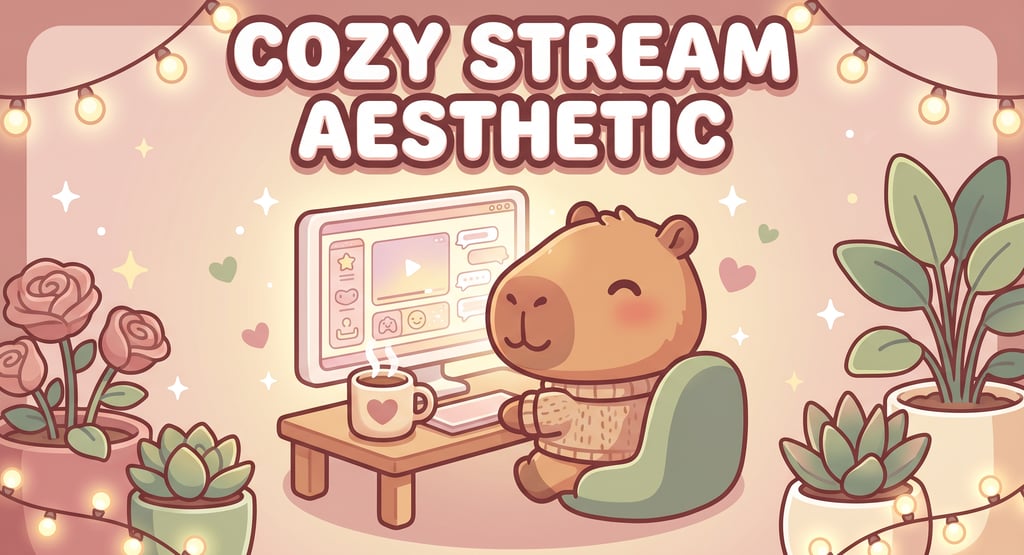
A cozy stream aesthetic is one of the most powerful things you can build on Twitch right now — and it has nothing to do with what game you're playing. Viewers aren't just choosing what to watch; they're choosing where to spend time. A stream that feels warm, soft, and welcoming keeps people in chat long after they meant to leave, turns lurkers into regulars, and builds the kind of loyal community that sticks around through slow nights and busy seasons alike.
This guide covers everything you need to know to build a cozy Twitch setup from scratch — the color palettes, the overlays, the lighting, the widgets, and the tiny details that make viewers feel like they've just walked into their favorite café. No design skills required.
What Is a Cozy Stream Aesthetic, Exactly?
"Cozy" on Twitch is a specific visual and emotional language. It's the streaming equivalent of a rainy Sunday afternoon with a warm drink and your favorite playlist — low-stress, soft, inviting. A cozy aesthetic typically combines:
Soft, warm color palettes — creams, dusty pinks, sage greens, warm lavenders, butter yellows.
Nature and comfort-themed visuals — cottagecore florals, café scenes, forest backgrounds, fairy lights, plants.
Gentle motion — slow drifting elements, softly glowing particles, a sleepy mascot blinking in the corner.
Rounded, organic shapes — nothing harsh or angular; everything feels handmade or hand-drawn.
A welcoming atmosphere — chat bubbles on screen, follower goals that feel like little celebrations, screens that don't rush you.
The cozy niche exploded alongside games like Stardew Valley, Animal Crossing, and Unpacking — but in 2026, it's everywhere. Just Chatting streamers, art streamers, study-with-me creators, and book streamers are all building cozy aesthetics because the vibe is what their audience is really showing up for.
Step 1: Choose Your Cozy Color Palette
Color is the foundation of any aesthetic. For a cozy setup, pick two main colors and one accent, all in muted or pastel tones. Here are the most popular cozy palettes in 2026:
The Classic Cottagecore
Dusty rose + sage green + cream.
Best for: nature lovers, forest themes, botanical vibes.
The Café & Bakery
Warm beige + caramel + soft pink.
Best for: study streams, lofi music streamers, Just Chatting cozy hosts.
The Pastel Dream
Baby pink + lavender + mint.
Best for: kawaii-leaning cozy setups, VTubers, cute gaming streamers.
The Moonlit Cottage
Soft navy + cream + dusty gold.
Best for: evening streamers, fantasy-game cozy setups, book streamers.
One rule: avoid saturated colors. A cozy palette breathes — it never shouts. If your colors feel too bright, nudge the saturation down by 20–30% and add a little warmth.
Step 2: Build Your Cozy Overlay Kit
A cozy aesthetic lives or dies by how cohesive its pieces look together. Here are the five elements you need and what to look for in each:
Animated Background or Scene
For a cozy stream, your background scene sets the whole tone. Think a softly glowing café window with rain outside, a sunlit forest clearing with drifting leaves, or a cozy bedroom with fairy lights twinkling on the walls. The key word is looping — a seamless animated loop keeps the scene alive without distracting from your gameplay.
Webcam Frame
Your facecam frame in a cozy setup should feel like a window or a picture frame — something that contains you warmly rather than boxing you in clinically. Look for floral borders, soft rounded edges, fairy light decorations, or a little shelf prop where your head "sits." A mascot peeking over the corner adds personality.
Animated Alerts
Cozy alerts should feel like a gentle little event — a soft chime, a bloom of flowers or sparkles, a sleepy animal waking up briefly to wave. They celebrate without startling. The wrong alert (loud, flashy, jarring) breaks the whole cozy atmosphere in a second.
Twitch Panels
Your channel panels are the first impression for anyone who scrolls down after discovering you. A set of matching cozy panels — all using your palette, your fonts, your little doodle accents — turns a random channel page into a place people want to explore. Include an About panel that tells viewers why your stream feels the way it does.
Animated Chat & Goal Widgets
This is the piece that makes a cozy stream feel alive. An animated chat widget puts community messages on screen in warm little speech bubbles — it makes lurkers feel part of something even without joining in. A goal widget with a soft fill animation (a teacup filling, a flower blooming, a progress bar edged in tiny leaves) gives everyone a shared milestone to root for.
The easiest way to get all five matching is a complete cozy stream package — every piece designed around one theme and palette. Browse the Stream Grafix cozy and kawaii collection for full matching kits, including fan-favourite starting points like:
Pastel Capybara Animated Stream Overlays — the ultimate cozy companion mascot, soft and gentle.
Magical Forest Stream Overlay — enchanted forest atmosphere with dreamy, drifting details.
White & Black Heart Minimal Overlay — clean and understated cozy for a chic, minimal take.
Step 3: Nail Your Lighting
Lighting is the real-world layer of your cozy aesthetic — and it has an enormous effect on how warm your stream feels.
Warm white over cool white, always. A cool-toned light makes any setup feel clinical. Warm white (2700K–3500K) wraps your face in a soft glow that reads as cozy on camera.
Fairy lights in the background. Even a cheap string of warm fairy lights behind you or around your monitor rim adds instant warmth to your scene.
Soft diffusion. A ring light or LED panel with a diffuser prevents harsh shadows. A white paper or fabric diffuser over a lamp works if you're on a budget.
Candles (fake ones). Battery-powered flickering candles around your space show up beautifully on camera and signal "cozy" immediately to any viewer.
You don't need expensive equipment. What you need is warm equipment, positioned slightly above eye level to avoid unflattering shadows.
Step 4: Choose Cozy Games (or Make Any Game Cozy)
The cozy aesthetic pairs naturally with:
Simulation & farming: Stardew Valley, Animal Crossing, Spiritfarer, Coral Island, Wylde Flowers.
Building & creativity: Minecraft (peaceful mode), Planet Coaster, Disney Dreamlight Valley.
Just Chatting & creative: Lofi drawing streams, study-with-me, reading streams, crochet or craft streams.
Puzzle & narrative: Unpacking, A Short Hike, Cozy Grove, Dorfromantik.
But here's the thing: you can make almost any game feel cozy with the right presentation layer. Many cozy streamers play horror games, RPGs, or even FPS titles — but their soft overlays, warm lighting, and gentle energy make the stream feel cozy regardless. Your aesthetic is bigger than your game category.
Step 5: Create a Cozy Atmosphere in Chat
The visual setup is only half of it. A cozy stream feels cozy because of how the streamer and community interact:
Greet every viewer by name. Even a simple "hey [name]!" when someone joins makes lurkers feel seen.
Read chat out loud. Putting messages on screen with a chat widget and then responding to them creates a conversation loop that keeps people engaged.
Use cozy channel point rewards. "Name my plant," "pick tonight's background music," "choose the next game" — small creative choices make viewers feel ownership over the space.
Set a slow-chat vibe. Let conversations breathe. Cozy streams aren't fast-paced. A comfortable silence while you play is part of the experience.
Seasonal decoration. Change your overlay accents with the seasons — autumn leaves in October, snowflakes in December, blooms in spring. Regulars notice and love it.
The Cozy Streamer's Brand Checklist
Before you go live, run through this quick check:
Palette: every on-screen element uses your 2–3 chosen colors.
Motion: animations are gentle, slow, and looping — never jarring.
Mascot: you have one consistent little character or icon viewers recognize as yours.
Lighting: warm white, diffused, slightly above eye level.
Widgets: chat and goal widgets are on screen, animated, and matching your palette.
Panels: your channel page has a matching cozy panel set with an About, Schedule, and Socials panel.
Screens: Starting Soon and BRB screens are looping cozy animations, not static images.
If you can tick all seven, you have a cozy stream. If you're missing two or more — the fastest fix is a complete matching overlay pack that covers all of them in one purchase.
🌿 New to Stream Grafix? Use code FIRST100 for 20% off your first order. Browse the full cozy collection here.
Common Mistakes That Kill the Cozy Vibe
Saturated or neon colors. Even one bright element breaks the warmth. Pastels and muted tones only.
Mismatched overlay pieces. A cozy background with a flashy gaming-style alert frame is visual whiplash. Match everything.
Harsh or cool-toned lighting. Blue-white light is the single fastest way to look un-cozy on camera.
No chat widget. Without chat on screen, your stream feels like a solo performance, not a shared space.
Cluttered layout. Cozy means breathing room. If the gameplay is buried under overlays, strip it back.
Loud or startling alerts. If your follow alert makes people jump, it's wrong for a cozy setup. Soft chimes, soft animations.
Skipping the panels. Your channel page is your storefront. Mismatched or empty panels send visitors away.
FAQs
1. What is a cozy stream aesthetic? A cozy stream aesthetic is a warm, soft visual style for Twitch that uses pastel colors, gentle animations, nature or comfort themes, and a welcoming atmosphere to make viewers feel relaxed and at home. It's one of the fastest-growing niches on Twitch in 2026.
2. What games are best for a cozy stream? Stardew Valley, Animal Crossing, Unpacking, Spiritfarer, and Minecraft peaceful mode are popular choices. But any game can feel cozy with the right overlay setup, warm lighting, and relaxed streamer energy.
3. What colors make a stream look cozy? Muted, warm pastels — dusty rose, sage green, cream, warm beige, lavender, and butter yellow. Avoid bright or saturated colors; they read as energetic rather than cozy.
4. Do I need a special overlay for a cozy stream? You don't need one, but a matching cozy overlay kit (animated background, webcam frame, alerts, panels, chat and goal widgets) is the fastest way to make your stream look cohesive, warm, and professional from the very first stream.
5. Can I have a cozy aesthetic and still play non-cozy games? Absolutely. Many successful streamers play horror, RPGs, or action games with a cozy aesthetic. Your visual setup, lighting, and energy create the atmosphere — the game is secondary.
Conclusion
A cozy stream aesthetic isn't just a look — it's an experience you create for your viewers. Warm colors, soft animations, gentle lighting, a welcoming chat, and a visual kit where every piece belongs together: that's what keeps people in your stream long past the point they meant to leave.
Start with your palette, add a matching overlay kit that covers overlays through to widgets, get your lighting warm, and let your personality do the rest. Browse the Stream Grafix cozy stream collection and use code FIRST100 for 20% off your first order. Your coziest stream is one setup away. 🍵✨

About
Stream Grafix offers premium Twitch overlays, alerts, and stream widgets. Crafted for creators who want to elevate their stream’s visuals and engage their audience.
© 2026 Stream Grafix. All rights reserved.