Get 20% off on your first purchase! Use code: FIRST100

Kawaii Twitch Overlays: Cute Stream Setup Guide (2026)
Build a kawaii Twitch overlay setup in 2026 with matching webcam frames, pastel alerts, panels and animated widgets. Easy step-by-step guide for streamers.
STREAMING TIPS
StreamGrafix
7/9/20265 min read
Introduction
If you've fallen in love with soft pastels, chubby mascots, and sparkly little hearts floating across a stream, you already know the vibe you're after — you just need the pieces to build it. Kawaii Twitch overlays turn a plain gameplay window into a cozy, welcoming space that viewers want to hang out in. And the best part? You don't need any design skills to pull it off in 2026.
This guide walks you through exactly what a cute stream setup is made of, how to make every piece match, and how to get it running in OBS, Streamlabs, or StreamElements in minutes. Whether you're a VTuber, a cozy-games streamer, or a Just Chatting host, you'll leave knowing how to build a kawaii aesthetic that actually looks professional.
What Makes an Overlay "Kawaii"?
"Kawaii" is Japanese for cute, but on stream it's a specific visual language. A true kawaii overlay usually leans on:
Soft pastel palettes — baby pink, lavender, mint, butter yellow, sky blue.
Rounded shapes — no harsh corners; everything is soft and bubbly.
Cute mascots — bunnies, cats, bears, capybaras, and chibi-style characters.
Playful decorations — sparkles, stars, hearts, clouds, and bows.
Gentle animation — bouncing mascots, twinkling sparkles, floating particles.
The goal is warmth. A kawaii setup signals "this is a friendly, low-stress community," which is exactly why it converts casual viewers into regulars.
The 5 Core Pieces of a Cute Stream Setup
A polished stream isn't one image — it's a coordinated kit. Here are the five pieces you actually need.
1. Webcam Frame
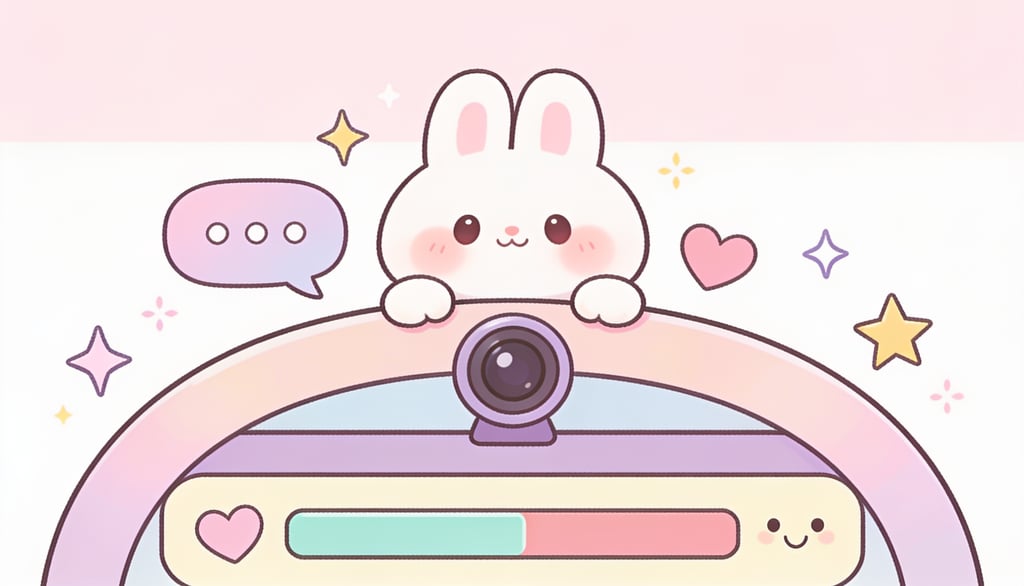
The border around your facecam is the single most-seen element on your stream. A cute pastel frame with a little mascot peeking over the corner instantly sets the tone. Look for versions in 16:9, 1:1, and 4:3 so it fits however you crop your camera.
2. Animated Alerts
Alerts fire every time someone follows, subs, donates, or raids. In a kawaii setup these should feel rewarding — a bunny hopping in, a burst of sparkles, a soft chime. Matching alerts are what make a new follower feel like a celebration.
3. Twitch Panels
Panels are the clickable info boxes under your stream (About, Schedule, Socials, Donate, Rules). A cohesive set of pastel panels keeps your channel page looking intentional instead of thrown together. Browse ready-made cute overlay packs in the Stream Grafix shop that already include a full panel set.
4. Chat & Goal Widgets
This is where most streamers stop short — and where you can really stand out. An animated chat widget puts your community's messages on screen in a cute bubble layout, and a goal widget shows follower or sub progress with a satisfying fill animation. These interactive pieces keep viewers engaged and encourage them to hit your goals.
5. Animated Screens & Transitions
"Starting Soon," "Be Right Back," and "Stream Ending" screens are your first and last impression. A looping pastel scene with a sleepy mascot makes even your downtime feel on-brand. Stinger transitions (a quick cute animation between scenes) tie the whole thing together.
Choosing Your Kawaii Color Palette
Pick two or three colors and commit. The most reliable kawaii combos in 2026 are:
Pink + lavender + cream — the classic soft-girl look.
Mint + peach + white — fresh and cozy, great for cottage-core streams.
Sky blue + pink + pale yellow — playful and bright, perfect for gaming.
Then keep your accents (text, sparkles, mascot) inside that palette. The fastest way to look amateur is mixing five saturated colors that fight each other. Matching beats maximalism every time.
The Secret to Looking Professional: Match Everything
Here's the single biggest upgrade you can make. A random free webcam frame from one place, alerts from another, and panels from a third will never look as good as a setup where every piece was designed together.
A matching stream bundle — overlays, webcam frame, alerts, panels, and screens all built around one mascot and palette — is what separates a hobby channel from a brand. It's also the easiest win: you buy once, install once, and everything already fits. Explore the full collection of cute, cohesive stream packages to grab a complete kit instead of piecing it together.
Some fan-favorite kawaii starting points:
Pastel Capybara Animated Stream Overlays — cozy, cute, and beginner-friendly.
Magical Forest Stream Overlay — dreamy, enchanted vibes for fairytale streams.
White & Black Heart Minimal Overlay — for a softer, chic take on cute.
Adding Personality: Mascots & Animated Widgets
A mascot is the heart of a kawaii brand. It shows up in your webcam corner, your alerts, and your loading screens, and over time viewers start to recognize your little bunny or cat the way they recognize a logo.
Pair that mascot with animated widgets and your stream stops feeling static. A chat widget where messages pop in beside a waving mascot, or a goal bar that fills with a happy little celebration when you hit a milestone, gives viewers a reason to interact. Interaction is the whole game on Twitch — the more your overlay invites participation, the faster your channel grows.
How to Install Kawaii Overlays (OBS, Streamlabs & StreamElements)
Cute overlays work with every major streaming tool. Here's the quick version:
OBS Studio
Click the + under Sources.
Add an Image (for PNG overlays) or Browser Source (for animated widgets).
Load your file or paste the widget URL, then resize to fit your canvas.
Streamlabs
Open the Editor.
Add your overlay as a source or import the theme.
Position each element and save.
StreamElements
Go to My Overlays and create a new overlay.
Add your widgets and custom pieces to the layout.
Copy the overlay URL and paste it into OBS as a Browser Source.
Most packs come with a setup guide, so you're usually live in under ten minutes.
Common Mistakes to Avoid
Clutter. Cute doesn't mean crowded. Leave breathing room around your gameplay.
Mismatched pieces. One free frame + random alerts = a messy look. Match everything.
Wrong resolution. Always use assets built for 1080p (or 1440p) so nothing looks blurry.
Skipping widgets. Static overlays are fine, but animated chat and goal widgets are what keep viewers engaged.
Low contrast text. Pastels are soft — make sure your text stays readable over them.
Where to Get a Ready-Made Kawaii Setup
You can piece a setup together from free bits, but if you want a cohesive, animated, professional kawaii look without the design headache, a ready-made pack is the shortcut. Every Stream Grafix cute overlay package is designed as a matching set — overlays, frames, alerts, panels, and widgets built around one adorable theme.
🎀 New here? Use code FIRST100 for 20% off your first purchase.
FAQs
1. What are kawaii Twitch overlays? They're cute, pastel-themed stream graphics — webcam frames, alerts, panels, and widgets — built around a soft, adorable "kawaii" aesthetic with mascots, sparkles, and rounded shapes.
2. Do kawaii overlays work with OBS and Streamlabs? Yes. Cute overlays are just standard PNG and browser-source files, so they work in OBS, Streamlabs, and StreamElements exactly like any other overlay.
3. Are cute overlays only for VTubers? Not at all. Cozy-games streamers, Just Chatting hosts, and gamers of every genre use kawaii setups. It's about the vibe you want for your community, not your content type.
4. Should I buy pieces separately or as a bundle? A matching bundle almost always looks more professional and saves money versus buying pieces one at a time — everything is designed to fit together around one theme.
5. What's the difference between static and animated kawaii overlays? Static overlays are still images. Animated overlays — bouncing mascots, sparkle effects, animated chat and goal widgets — add motion and interactivity that keep viewers engaged.
Conclusion
A kawaii stream setup is one of the fastest ways to make your channel feel warm, memorable, and professional. Pick a palette, choose a mascot you love, and — most importantly — make every piece match. Start with a cohesive cute stream package, add animated chat and goal widgets for interactivity, and you'll have a setup viewers remember long after the stream ends.
Ready to build your cozy corner of Twitch? 🐰✨ Browse the Stream Grafix kawaii collection and use FIRST100 for 20% off your first order.

About
Stream Grafix offers premium Twitch overlays, alerts, and stream widgets. Crafted for creators who want to elevate their stream’s visuals and engage their audience.
© 2026 Stream Grafix. All rights reserved.