Get 20% off on your first purchase! Use code: FIRST100

Twitch Emotes 101: What They Are & How to Get Started (2026) | Stream Grafix
New to Twitch emotes? Learn what they are, why they matter for community growth, the size/format requirements, and how to get started in this beginner guide.
STREAMING TIPSTWITCH TIPS & GUIDE
StreamGrafix
7/19/20266 min read
Introduction
If you've spent any time in a Twitch chat, you've seen them flying by — tiny animated faces, mascots mid-laugh, hearts popping across the screen. Twitch emotes are one of the platform's most powerful (and most misunderstood) community features. They're not just decoration; they're a language your community builds together, one that turns a chat full of strangers into a group of regulars who all know exactly what "that one emote" means.
This guide breaks down what emotes actually are, why they matter more than most beginners realize, the technical requirements you need to know, and exactly how to get your first set live.
What Are Twitch Emotes?
A Twitch emote is a small custom image — usually a face, character, or symbol — that viewers can type into chat using a text code (like :PogChamp: or a channel-specific code) and have it render as a graphic instead of plain text. Some emotes are global (available to everyone on Twitch), and some are channel emotes — custom images tied specifically to one streamer's channel, unlocked through subscriptions or, for eligible channels, earned through Twitch's expanded monetization tools.
There are three main types:
Static emotes — a single, still image.
Animated emotes — a short looping animation (available to Twitch Partners and eligible Affiliates).
Emote modifiers — layered effects some subscribers can stack on top of any emote (like adding snow or rain).
Why Emotes Matter More Than People Think
New streamers often treat emotes as a "nice to have" once they hit bigger milestones. That's backwards thinking, for a few reasons:
They Create Community Identity
An emote is a shared symbol only your community understands. When a viewer uses your channel's emote in another streamer's chat, it's a walking advertisement for your channel — free discovery every single time.
They Reward Loyalty
Custom emotes are one of the biggest subscription incentives on Twitch. Viewers subscribe specifically to "unlock" a streamer's emote set, especially when the designs are genuinely fun to use. A great emote set can noticeably boost your subscriber conversion.
They Encourage Chat Participation
Typing an emote is a low-effort way to react without writing a sentence. This means even quiet lurkers who'd never type "that's hilarious" will happily spam a laughing emote — which keeps chat active and makes your stream look lively to new visitors scrolling past.
They Build Emotional Connection
A well-designed emote pack — with faces that capture a streamer's specific expressions, catchphrases, or inside jokes — makes viewers feel like they're part of an inside circle. That emotional connection is what turns a casual viewer into a long-term community member.
Twitch Emote Size & Format Requirements
If you're designing or commissioning emotes, here's exactly what Twitch requires:
Upload sizes: Twitch asks for three versions of every emote — 28×28px, 56×56px, and 112×112px.
File format: PNG with a transparent background (animated emotes use an animated PNG/GIF-style format supported by Twitch's uploader).
Design for tiny sizes first. Most viewers will actually see your emote at 28px in chat — sometimes even smaller on mobile. Always design the smallest size first and make sure the expression or shape is instantly readable before scaling up.
High contrast, simple shapes. Detailed shading and fine linework disappear at emote size. Bold outlines and clear color blocking read far better.
Consistent style across a set. If you're building more than one emote, keep a consistent art style, outline weight, and color approach so the whole set feels like a matching family — the same principle that makes overlay bundles look professional.
How Many Emote Slots Do You Get?
Twitch emote slots scale with your channel's status:
Affiliate: a starting set of subscriber emote slots, expandable as you add subscriber tiers.
Partner: significantly more slots across tiers, plus animated emote support.
Twitch's 2026 monetization expansion has opened emotes and other tools to more streamers earlier in their journey than before — but check your current Creator Dashboard for your exact slot count, since requirements are periodically updated by Twitch.
How to Add Emotes to Your Channel
Go to your Creator Dashboard → Viewer Rewards → Emotes.
Click Add Emote for the tier you want to fill.
Upload your three required sizes (28px, 56px, 112px).
Set your emote's text code (this is what viewers type to use it — keep it short, memorable, and typo-proof).
Submit for review. Twitch checks emotes against their guidelines before they go live.
Once approved, the emote unlocks for subscribers at that tier immediately, and it starts appearing as a suggestion in chat the moment someone types the matching code.
Designing Emotes That Actually Get Used
Not every emote gets spammed in chat — some just sit in the panel unused. Here's what separates the ones people actually reach for:
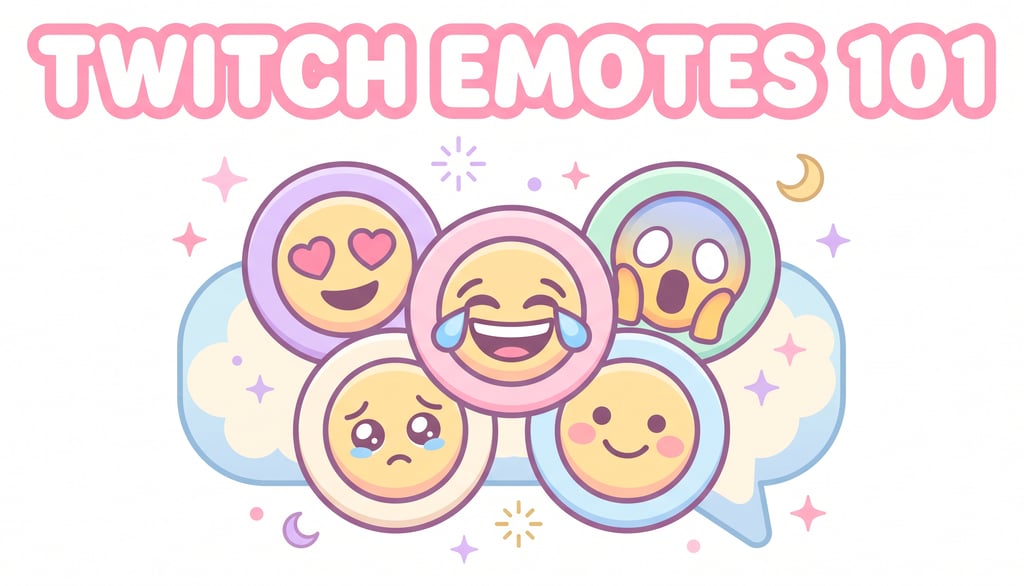
Strong, single-read expressions. "Laughing," "shocked," "heart eyes," "crying" — one clear emotion per emote, not a complicated scene.
A recognizable mascot or your own likeness. Viewers connect faster with a consistent character (yours, or a channel mascot) than with generic clipart-style faces.
Reaction-shaped, not decoration-shaped. The best-performing emotes are ones viewers can drop into a real conversation — "that's cursed," "hype," "sad," "love this" — rather than purely decorative icons.
Fits your channel's existing visual brand. If your overlays, alerts, and panels use a kawaii pastel palette, your emotes should match. A cohesive visual identity across every touchpoint — overlays, alerts, panels, and emotes — is what makes a channel feel fully "designed" rather than assembled piece by piece.
Common Mistakes New Streamers Make with Emotes
Rushing the design at full size only. If it doesn't read clearly at 28px, it will get skipped in chat no matter how good it looks zoomed in.
Making emotes too detailed. Fine linework and gradients disappear at small sizes — bold and simple wins every time.
Ignoring brand consistency. A mismatched emote style next to a polished overlay and alert set breaks the professional feel you've built everywhere else.
Picking confusing text codes. If viewers can't remember or spell your emote code, it never gets used — keep codes short and intuitive.
Treating emotes as decoration instead of community tools. The most-used emotes are reaction-ready, not just pretty pictures.
Emotes Are Part of a Bigger Visual Identity
Here's the bigger picture worth understanding: emotes are just one piece of your channel's overall visual identity — alongside your overlays, alerts, panels, and animated widgets. Viewers form an impression of your channel from all of these together. A cohesive, matching visual brand across every element — down to your emotes — is what separates a channel that looks intentional from one that looks thrown together.
If your overlays, alerts, and panels aren't matching yet, that's the highest-impact place to start before you even think about emotes. Explore the Stream Grafix shop for complete matching packages — kawaii, cozy, and minimal styles — so your whole channel, emotes included, tells one consistent visual story.
🎀 New here? Use code FIRST100 for 20% off your first purchase.
FAQs
1. What are Twitch emotes? Twitch emotes are small custom images viewers type into chat using a text code, which render as graphics instead of plain text. They include global emotes available to everyone and channel emotes tied to a specific streamer, often unlocked through subscriptions.
2. What size do Twitch emotes need to be? Twitch requires three sizes per emote: 28×28px, 56×56px, and 112×112px, all as transparent-background PNGs (or an animated format for animated emotes).
3. How many emote slots do I get on Twitch? Slot counts depend on your channel status — Affiliates start with a base set of subscriber emote slots that expand with tiers, while Partners get significantly more, plus animated emote support. Check your Creator Dashboard for your current allotment.
4. Do emotes actually help channel growth? Yes. Emotes reward subscriptions, increase chat participation from viewers who'd otherwise stay quiet, and act as free advertising whenever your emote gets used in other channels' chats.
5. Should my emotes match my overlay design? Ideally, yes. A consistent visual style across your overlays, alerts, panels, and emotes makes your entire channel feel professionally branded rather than pieced together from different sources.
Conclusion
Twitch emotes look small, but they carry real weight — they reward loyalty, spark chat participation, and act as a walking advertisement for your channel every time they're used elsewhere. Design them simple, make sure they read clearly at 28px, and — most importantly — keep them consistent with the rest of your channel's visual brand.
If your overlays, alerts, and panels could use that same cohesive polish, browse the Stream Grafix collection and use code FIRST100 for 20% off your first order. A channel that looks put-together, from panels to chat, is a channel viewers remember. ✨

About
Stream Grafix offers premium Twitch overlays, alerts, and stream widgets. Crafted for creators who want to elevate their stream’s visuals and engage their audience.
© 2026 Stream Grafix. All rights reserved.